for_agencies
AI coding spend, per client.
Your developers use Claude Code and Cursor across a dozen client repositories, and the invoices arrive per tool, not per client. PromptConduit attributes every AI session to the repo it ran in, so you can see what each client's work actually cost, re-bill it, or price the next fixed bid with real numbers.
Three steps, then it's just a report
-
curl -fsSL https://promptconduit.dev/install | bashEach developer installs the CLI once. It hooks into Claude Code, Cursor, Gemini CLI, Codex, Copilot, and Grok Build and writes every session to a local file first.
-
promptconduit initEach developer signs in and accepts the invite to your team. Every event already carries the repo, branch, commit, and linked pull request it came from.
-
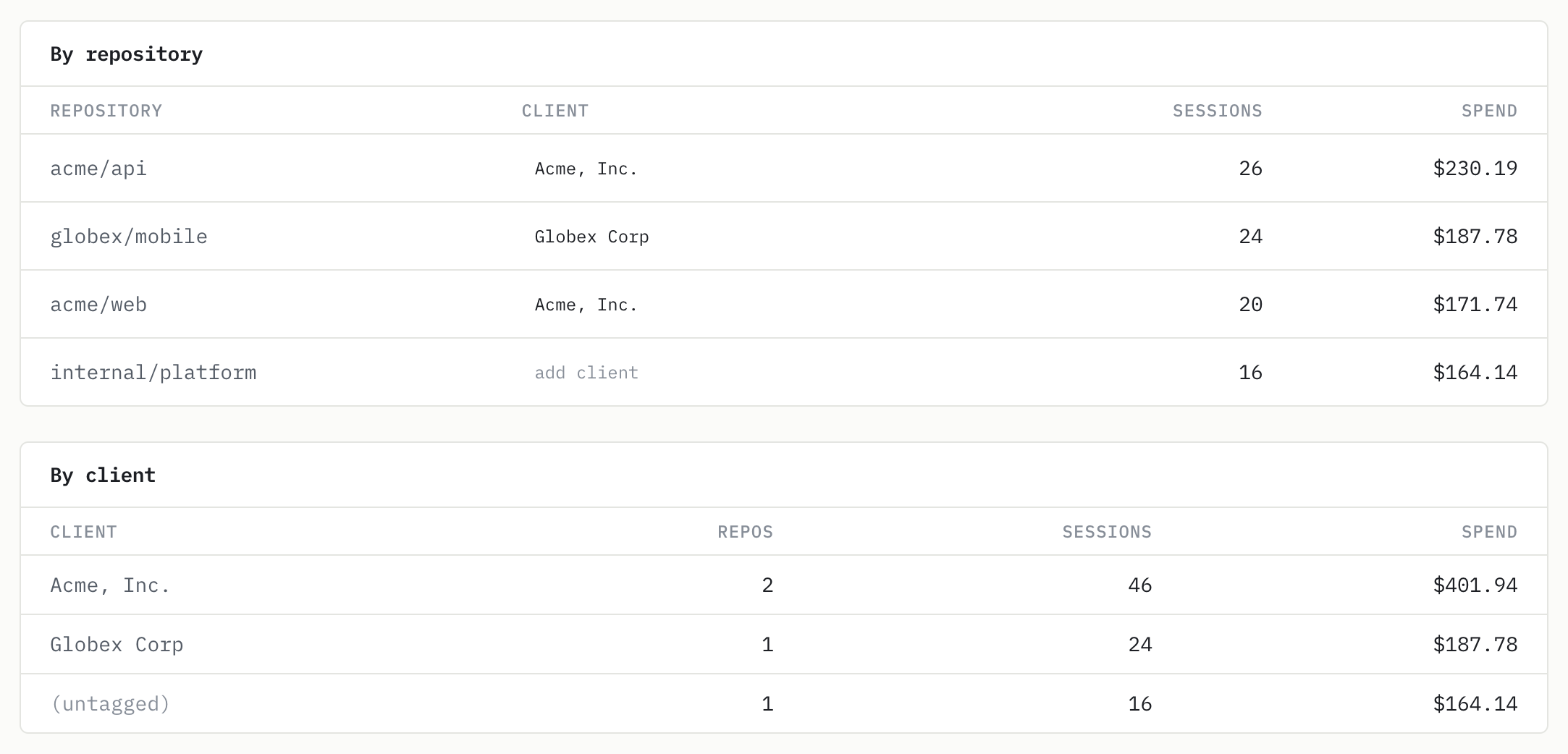
app.promptconduit.dev/teamThe team page breaks cost down by repository, branch, PR, member, model, and day. Tag each repo with its client to get a per-client total, then export it as CSV.
Questions agencies ask
- How do I attribute Claude Code and Cursor spend to a client?
- Work for each client happens in that client’s repositories, and PromptConduit stamps every captured event with its repo and branch. Tag each repository with the client it belongs to, and the team cost view totals spend per client for the period. Export it as CSV by client, repository, pull request, member, or day for re-billing.
- Does it work if different developers use different AI tools?
- Yes. The same CLI captures Claude Code, Cursor, Gemini CLI, Codex, Copilot, and Grok Build, and costs are priced from public API rates so totals are comparable across tools.
- Can clients see our data?
- No. The dashboard is visible only to members of your team, and it shows names and numbers such as repo names, token counts, and costs, never prompt text. Each event is written on the developer’s machine first. When it syncs, the full event, which can include prompt text, is stored privately under that developer’s account, and the team views are built from the names and numbers alone. The security page lists exactly what syncs.
- What does it cost?
- Free for up to 3 people. Team is $99/month for up to 15, and Growth is $249/month for up to 50. Flat, not per seat.
See pricing Read the quick start
Guides: attributing AI spend to teams and repos, Cursor expense tracking for teams, and Claude Code OpenTelemetry cost.
Questions about your setup? [email protected]